
Introduction to Matter for NX Families
Matter is an IP-based application protocol for interoperable connected devices. In this tutorial series, an NX device is commissioned over Bluetooth Low Energy and then communicates as a Matter device over Thread.
This page provides the minimum terminology required before you begin. It is not a detailed protocol lesson.
Validation scope The workflow in this series targets NX15 and NX40 development platforms. The final hardware revision, board target, SDK version, sample configuration, and supported controller ecosystem must be confirmed by KORLINX R&D before publication.
Matter in the NX workflow
The target workflow is:
- An uncommissioned NX device advertises over Bluetooth Low Energy.
- A Matter commissioner discovers the device and opens a secure commissioning session.
- The commissioner provides operational credentials and the Thread Operational Dataset.
- The NX device joins the Thread network.
- A Matter controller communicates with the device over IPv6 and Thread.
Bluetooth Low Energy is used for commissioning. It is not the normal Matter application transport after the device has joined Thread.
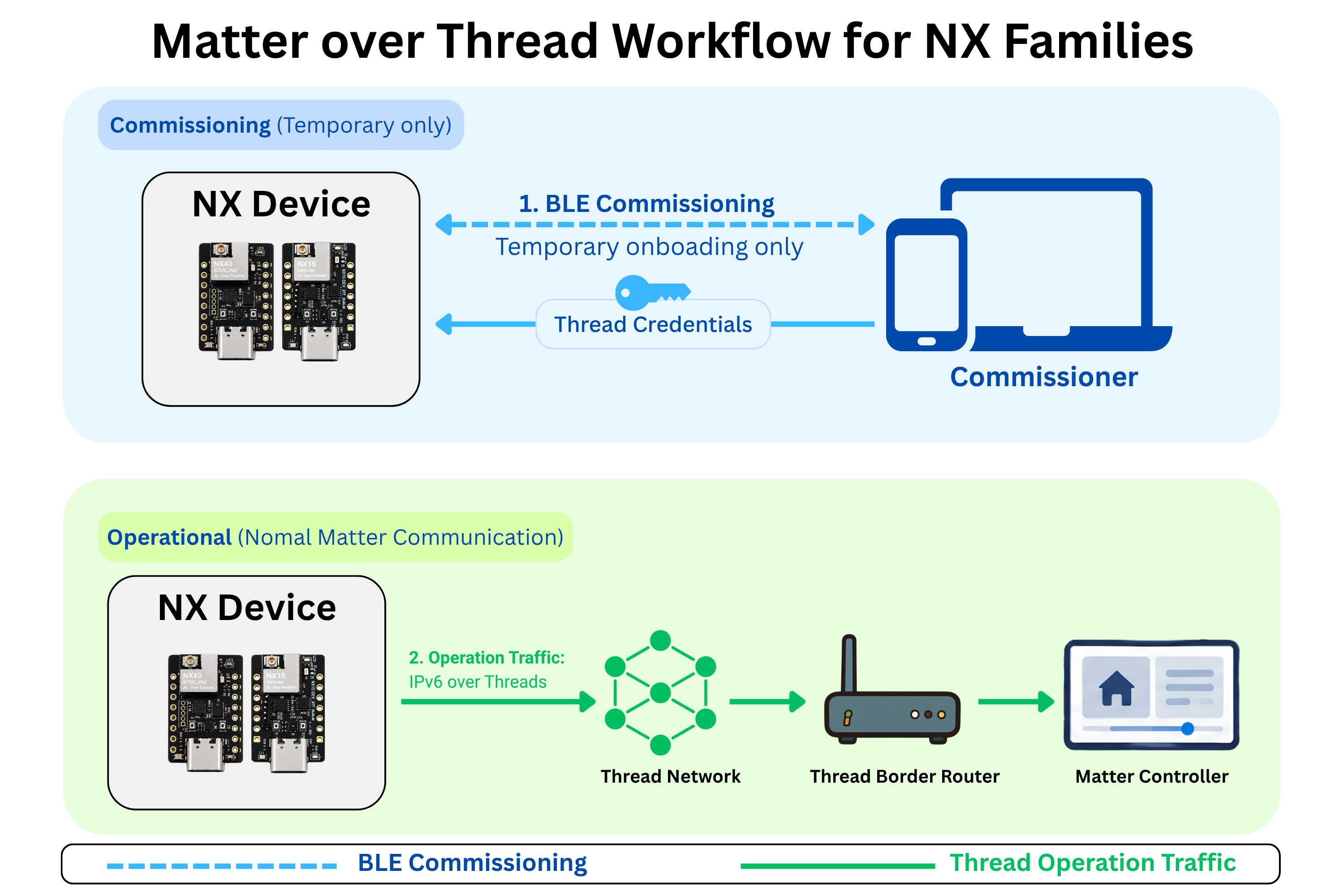
Components you need to recognize
| Component | Role in this series |
|---|---|
| NX Matter device | The device being built, flashed, commissioned, and controlled. |
| Commissioner | Adds the NX device to a Matter fabric. |
| Controller | Reads device state and sends Matter commands after commissioning. |
| Thread Border Router | Connects the Thread IPv6 mesh to the adjacent IP network. |
| Matter fabric | The trust domain that contains the commissioned Matter nodes. |
| CHIP Tool | A development controller used to commission and test Matter devices. |
One physical hub can perform more than one role. For example, a commercial hub can act as commissioner, controller, and Thread Border Router.
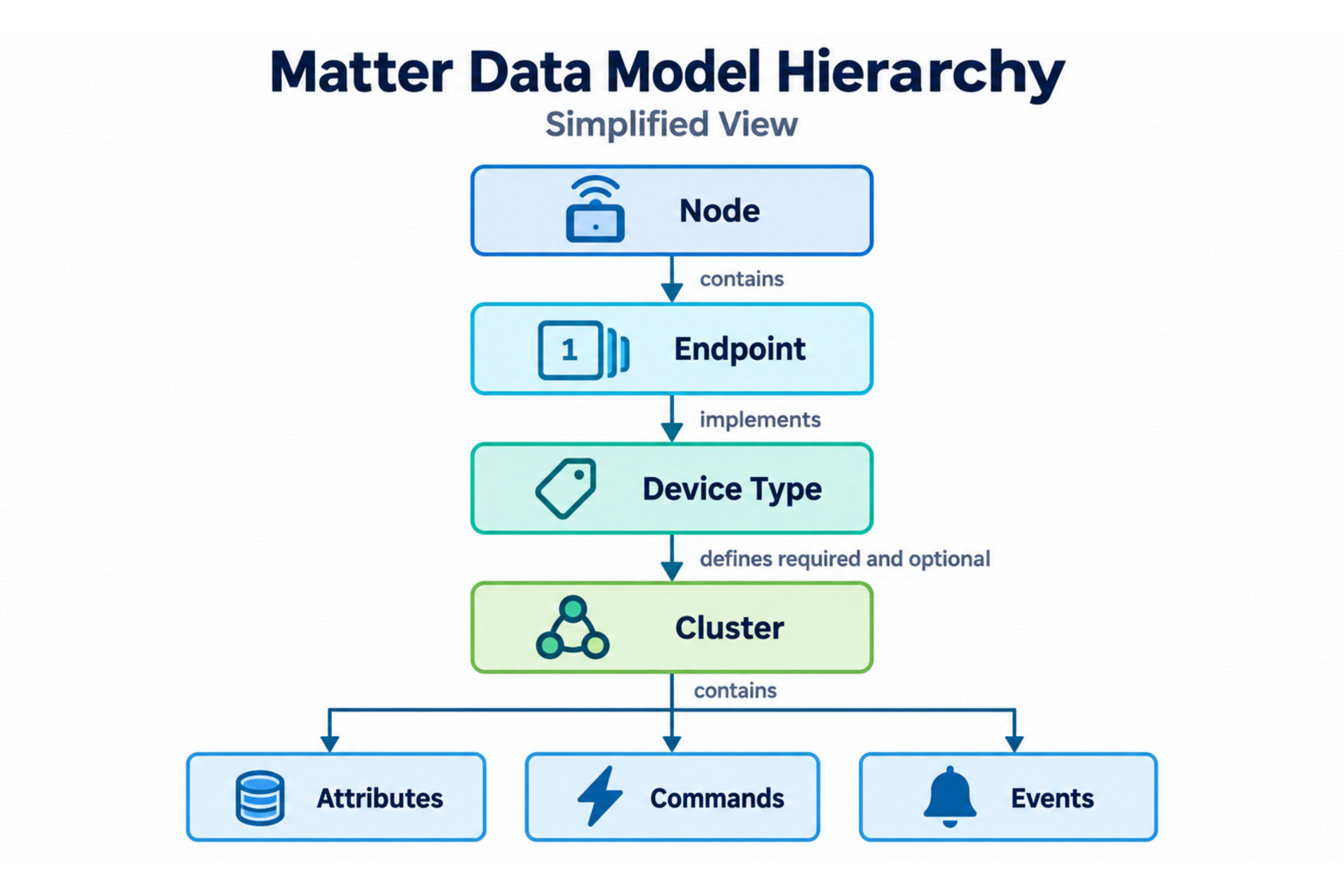
Matter data model keywords
You do not need to understand the complete Matter data model before starting the practical tutorials. Keep these keywords available when you need to inspect an application or search the official documentation.
| Keyword | Short meaning |
|---|---|
| Node | An addressable Matter device or logical resource. |
| Endpoint | A functional part of a node. |
| Device Type | The standardized behavior assigned to an endpoint. |
| Cluster | A group of related functions. |
| Attribute | A state or configuration value. |
| Command | An action requested by a controller. |
| Event | A notable occurrence reported by a device. |
Developer reference keywords: Matter data model, Matter Node, Endpoint 0, Device Type, Cluster, Attribute, Command, Event
Tutorial path
Follow the series in this order:
- Set Up the Matter Development Environment for NX Families
- Getting Started with Matter Quickly on NX Families
- Matter Development with NX Families
- Matter Development Framework Overview
Official references
- Connectivity Standards Alliance - Matter
- Nordic Semiconductor - Matter in nRF Connect SDK
- Google Home Developers - Matter primer
🎉 You're Ready!
You Know the NX Matter Development Path
You can now distinguish commissioning from normal Matter communication and recognize the main components used in a Matter over Thread system.
This is enough context to begin the practical setup.
Here's what you accomplished:
- ✅ Identified Matter as the application protocol
- ✅ Identified Bluetooth Low Energy as the commissioning link
- ✅ Identified Thread as the operational network used in this series
- ✅ Recognized the commissioner, controller, and Thread Border Router roles
- ✅ Learned the main Matter data model keywords
- ✅ Reviewed the complete NX Matter tutorial path
What's Next?
Environment Setup
Install the required Nordic development tools and verify that your NX board is detected.
Matter Quick Start
Use a validated firmware package to commission an NX device without building from source.
Framework Overview
Review the project areas used to configure the Matter data model and application behavior.
You have the required Matter vocabulary. Continue with the development environment setup before connecting or flashing an NX board.